


















- Industrial display
-
Industrial Products
- DC Servo Drive
- AC Servo Drive
- Industrial board
- Siemens
- Switch Sensor
- Proximity Switch
- Temperature Controller
- Protection Relay
- Fiber Optic Sensor
- Encoder
- Fan
- other
- Heidelberg
- MITSUBISHI
- FANUC
- Siemens adapter
- Fujitsu connector
- Motherboard
- Board
- Contactor
- Circuit
- OMRON
- Relay
- Motor Driver
- power supply
- Cable
- Transformer
- HMI Touch Glass
-
HMI Full Machine Whole unit
- OMRON HMI Touch Panel
- Siemens HMI Touch Panel
- Mitsubishi HMI Touch Panel
- Allen-Bradley automation HMI Touch Panel
- DELTA HMI Touch Panel
- Proface HMI Touch Panel
- KINCO DELTA HMI Touch Panel
- HITECH HMI Touch Panel
- WEINTEK HMI Touch Panel
- TECVIEW HMI Touch Panel
- WEINVIEW HMI Touch Panel
- PANASONIC HMI Touch Panel
- KYOCERA HMI Touch Panel
- SCHNEIDER HMI Touch Panel
- Module
- lcd inverter
- Membrane Keypad Switch
- Zhiyan Customized Touch Screens
- Frequency Inverter
- Servo Motor
- PLC
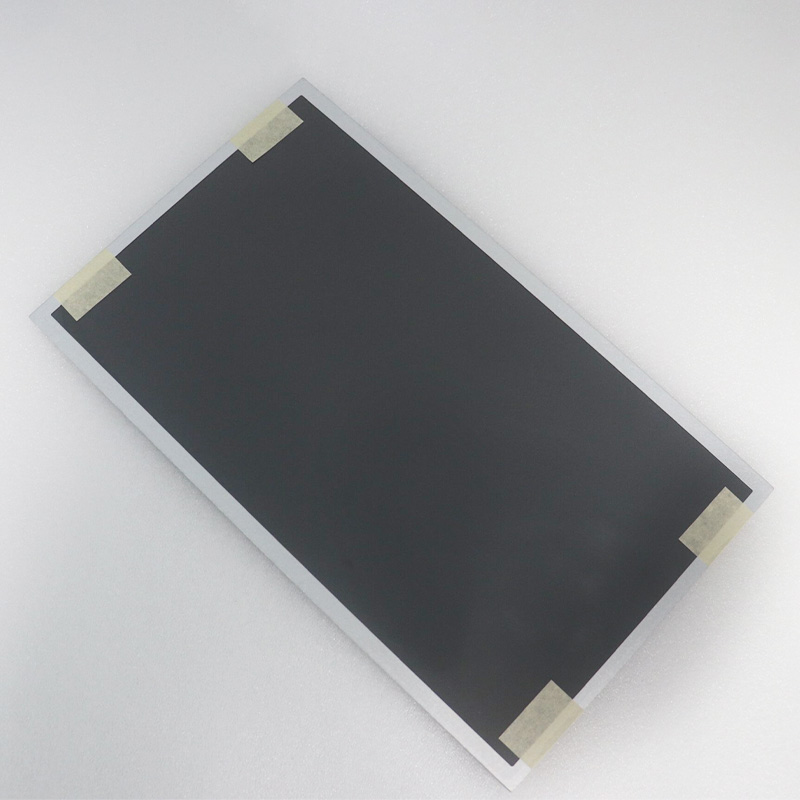
In the industrial and commercial display landscape, the 15.6-inch panel has long been a standard bearer for balanced functionality. However, not all touch screens are created equal, and the distinction often lies not just in the hardware, but in the rigorous validation behind it. This article delves deep into the G156HTN02.0 touch screen, a model that has garnered attention for its robust performance characteristics and its unique pre-shipment testing protocol. While many manufacturers cite "quality control" as a checkbox, this model presents a case study in reliability assurance: the promise of a 100% tested before shipping process. We will explore what this specific testing guarantees for end-users, the technical architecture of the screen itself, and why this combination of tested reliability and standard form factor makes it a critical component for applications ranging from medical equipment to industrial automation. This is not merely a review of a screen; it is an analysis of how a single component can influence operational uptime and user trust.
The Anatomy of a 15.6-Inch Industrial Workhorse
The G156HTN02.0 is not a generic consumer-grade display. It is engineered to meet the demands of environments where clarity and durability are non-negotiable. At its core, it utilizes a a-Si TFT-LCD (amorphous silicon thin-film transistor) technology, which is the industry standard for high-volume, reliable production. The "15.6 inch" diagonal offers a sweet spot—large enough for detailed data visualization or multi-window workflows, yet compact enough for integration into operator panels, kiosks, and medical carts.
What truly sets this panel apart is its resolution and viewing angle characteristics. Operating at a standard 1920 x 1080 (Full HD) resolution, it provides a pixel density that ensures text is sharp and graphics are free from visible pixelation. Critically, the TN (Twisted Nematic) technology employed here is optimized for fast response times, often in the 8ms to 20ms range (G2G), making it suitable for systems that require rapid touch-refresh interaction without ghosting. Furthermore, the panel is designed for a wide operating temperature range (typically -20°C to +70°C), distinguishing it from commercial monitors that fail in heat or cold. The inclusion of a standard eDP (embedded DisplayPort) interface ensures broad compatibility with modern single-board computers and industrial motherboards, making integration straightforward for system integrators.
Decoding "100% Tested Before Shipping" — A Promise of Reliability
The phrase "100% tested before shipping" is a marketing slogan for some, but for the G156HTN02.0 supply chain, it is a specific, verifiable process. Unlike batch sampling where only a statistical percentage of units are examined, this protocol mandates that every single unit undergoes a functional test on the production line. This is a critical differentiator in the industrial sector where a single dead pixel or touch malfunction at a remote installation can incur significant service costs.
The testing process typically includes five key phases. First, a panel backlight inspection checking for uniformity and luminosity across a dark screen white screen. Second, a color gamut verification ensuring that the panel meets its stated NTSC 72% (typical) or sRGB coverage. Third, a touch functionality test using a robotic arm or jig that simulates multi-touch gestures across the entire grid to detect dead zones or erratic signals. Fourth, a connectivity and power cycle test to confirm the eDP and touch controller (often USB or I²C) handshake correctly. Finally, a visual inspection for cosmetic defects such as scratches or glass bubbles under factory lighting. This comprehensive gauntlet ensures that the unit leaving the warehouse has a statistical confidence approaching 99.9% that it will function correctly on arrival, drastically reducing RMA rates for OEMs and integrators.
Touch Technology: Projected Capacitive and Its Operational Context
The G156HTN02.0 is commonly paired with a Projected Capacitive (PCAP) touch overlay, which has become the de facto standard for premium industrial touch interfaces. Unlike older resistive touch screens that rely on pressure, PCAP technology works by detecting the electrical disturbance caused by a conductive object (like a human finger) on an electrostatic field. This offers several intrinsic advantages: multitouch capability (typically 5 to 10 touch points), high optical clarity (no air gap or flexible membrane to degrade the image), and superior scratch resistance (glass-to-glass bonding or air-bonding with tempered glass).
From an operational standpoint, the specific implementation for this model often includes glove touch sensitivity. This is not an automatic feature; it requires a more sensitive controller chip and careful tuning at the firmware level. In industrial or medical contexts, operators frequently wear latex, nitrile, or cotton gloves. A standard PCAP screen will fail to register touches through these non-conductive materials. The G156HTN02.0 tested units are often calibrated to compensate for the capacitance loss caused by the glove. Additionally, the controller is tested for rejection of water droplets and palm touches, preventing accidental inputs in wash-down environments. This level of tuning is precisely why individual unit testing is vital—each panel may require slight calibration tweaks to ensure consistent performance across the entire active area.
Application Ecosystems: Where This Screen Excels
The combination of a robust 15.6-inch format, Full HD resolution, PCAP touch, and rigorous pre-shipment testing makes the G156HTN02.0 a prime candidate for three distinct application ecosystems. First is the medical environment. PACS workstations, surgical monitors, and bedside infotainment terminals require screens that are easy to clean (IP65-rated front surface) and deliver consistent color for diagnostic imaging. The 100% testing ensures that no dead pixels appear on a monitor used for viewing CT scans or MRI data, where even a single defective pixel could be misleading.
Second is the industrial automation and HMI (Human-Machine Interface) sector. Factory floors are plagued by vibration, temperature swings, and electromagnetic interference. The wide temperature tolerance and solid-state touch controller (with no moving parts) make this panel resilient. The pre-shipment test verifies that the touch remains accurate even after the panel has been subjected to temperature stress, a common failure point for cheaper alternatives. Third, the self-service kiosk and digital signage market benefits greatly. In public-facing devices like ticketing machines or information dashboards, uptime is tied directly to revenue or user satisfaction. Receiving a panel that has already passed a functional test for touch accuracy, brightness consistency, and connectivity massively reduces the "Dead on Arrival" (DOA) rate, which is the single biggest pain point for kiosk deployers who have to service units across multiple cities. The logistical simplification offered by a 100% tested component is often undervalued but financially significant.
Supply Chain Assurance: The True Cost of a Tested Unit
When an engineer or procurement specialist selects the G156HTN02.0 with the 100% testing stamp, they are effectively buying insurance against downtime. The cost of a single field failure in an industrial installation can be astronomical—including service technician travel time, replacement part logistics, lost production time, and potential liability. The upfront premium paid for a tested unit (which is typically only 5-10% higher than a non-tested batch product) is negligible compared to these potential costs.
Furthermore, this testing process creates a digital trail of accountability. Each tested unit often receives a serial number, and test logs can be produced to show the specific voltage, capacitance, and pixel counts recorded during its individual test. For ISO 9001 or FDA-regulated operations, this traceability is not just a luxury; it is a compliance requirement. The "100% tested" promise also eliminates the "lottery effect" of batch sampling, where a perfectly good batch but a bad individual unit can slip through. In sectors where a malfunctioning screen could mean a safety hazard (e.g., a control panel for a reactor or a medical ventilator), the optionality of a fully inspected unit is a mandatory risk mitigation strategy. Ultimately, the decision is a trade-off between the marginal processing cost of testing and the exponential cost of failure. For serious integrators, the G156HTN02.0 represents a mature, low-risk choice precisely because of this upfront verification.
FAQs: 15.6 inch G156HTN02.0 Touch Screen
Q1: What does "100% Tested before Shipping" mean in practice?A1: Every single unit is physically connected to a test rig to verify backlight uniformity, pixel functionality (no dead/stuck pixels), touch signal accuracy across the entire grid, and eDP interface connectivity before being packed. It is not a random spot-check.
Q2: Is the touch screen resistive or capacitive?A2: The G156HTN02.0 is most commonly integrated with a Projected Capacitive (PCAP) touch overlay, offering multi-touch, high clarity, and glove compatibility. Resistive versions may exist but are less common for this model.
Q3: What is the typical response time of this panel?A3: The TN panel typically has a response time in the range of 8ms to 20ms (Gray-to-Gray), which is well-suited for real-time touch interaction and avoids noticeable ghosting during fast screen transitions.
Q4: Can this screen be used outdoors or in direct sunlight?A4: Standard models have a brightness around 300-400 nits. For direct sunlight, a bonded high-brightness version (1000 nits+) or an optical bonding treatment to reduce glare would be required. The standard model works well indoors or under shade.
Q5: What interface does it use for video and touch?A5: It uses a standard eDP (Embedded DisplayPort) interface for video (usually 2-lane or 4-lane eDP 1.2). The touch controller typically communicates via USB or I²C interface.
Q6: Does it work with standard Linux or Windows single-board computers?A6: Yes. The eDP and USB touch interface are standard protocols supported by most industrial single-board computers (e.g., Raspberry Pi 4/5, Intel NUC, Rockchip SBCs) without needing custom drivers for basic functionality.
Q7: What are the dimensions of the glass cover?A7: The dimensions are specific to the model but are generally designed to fit a 15.6-inch diagonal with a bezel width of approximately 10-15mm. Precise mechanical drawings should be requested from the supplier before integration.
Q8: Is the touch screen waterproof?A8: The front surface often has an IP65 rating (dust-tight and protected against low-pressure water jets), making it washable. However, full submersion is not supported. The touch controller may also reject false touches from rain droplets.
Q9: What happens if I receive a unit that fails despite the test?A9: Reputable suppliers offer a DOA (Dead on Arrival) exchange window. The 100% testing drastically reduces DOA rates, but warranty terms covering defects in workmanship should be confirmed at purchase.
Q10: What does "TN" technology mean for viewing angles?A10: TN panels have narrower optimal viewing angles (typically 70°/70°/50°/60° L/R/U/D) compared to IPS. This is acceptable for single-user industrial HMIs but creates contrast shift if viewed from extreme angles in a multi-user kiosk setup.
Conclusion: A Standard Component, A Differentiated Standard
In the world of industrial displays, the G156HTN02.0 15.6-inch touch screen occupies a space that is both familiar and exceptional. It is familiar because its form factor and resolution are well-established benchmarks in the industry. It is exceptional because of the rigorous, verifiable, and disciplined approach to quality assurance through the 100% pre-shipment testing protocol. This article has argued that the real value of this component lies not in a revolutionary new technology, but in the radical minimization of risk. For the system integrator, the medical device manufacturer, or the kiosk deployer, the decision to use this specific panel is a decision to buy confidence. It is an admission that the total cost of ownership includes not just the initial procurement price, but the costly consequences of failure in the field. By ensuring every pixel and every touch point is verified before it leaves the warehouse, the G156HTN02.0 transforms a commodity display into a strategic asset for operational reliability. When uptime is non-negotiable, and when a touch failure means a workflow stops, this tested standard is not just a good choice—it is the only responsible one.





